NomaPort
Your guide

How NomaPort works — from first click to daily protection

A clear guide through bundles, products and setup. Whether you need a travel hotspot, device checks or team training, here is exactly what happens at each step.

NomaPort secure workspace setup with hotspot and laptop
NomaPort RoamVPN · ConnectedSecure route activeNomaPort CheckScore · 78Travel readiness · GoodNomaPort VaultBackup · EncryptedNomaPort AIPolicy · Active

NomaPort combines secure connectivity hardware with digital tools for device checks, training and safer workflows — all managed from one account.

  • Bundles combine hardware and software in one checkout
  • Digital products work from your browser and NomaApp
  • No IT team required — we configure before shipping

See it in action

What NomaPort Check looks like on your device

A real view of the dashboard, security checks, and travel readiness — so you know what you get before you buy.
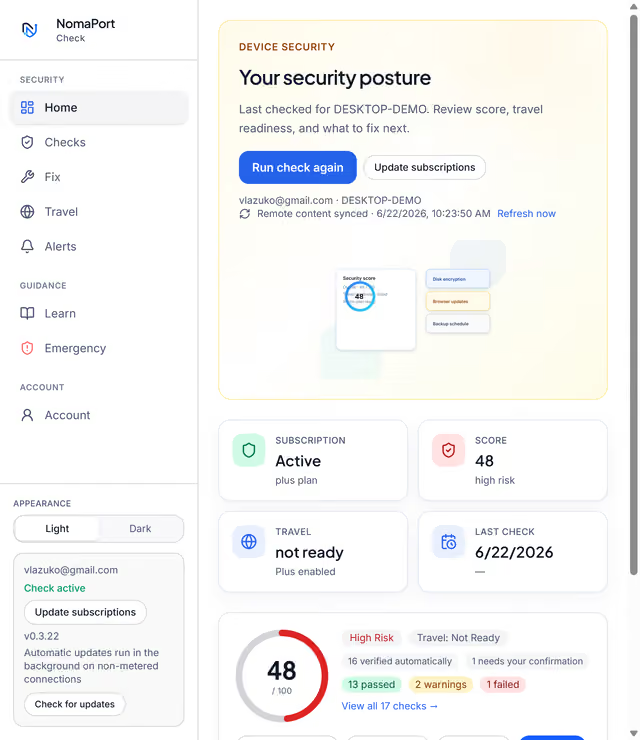
NomaPort Check dashboard showing security score and status cards

Security posture at a glance

Score, subscription status, travel readiness, and what to fix next — on one screen.

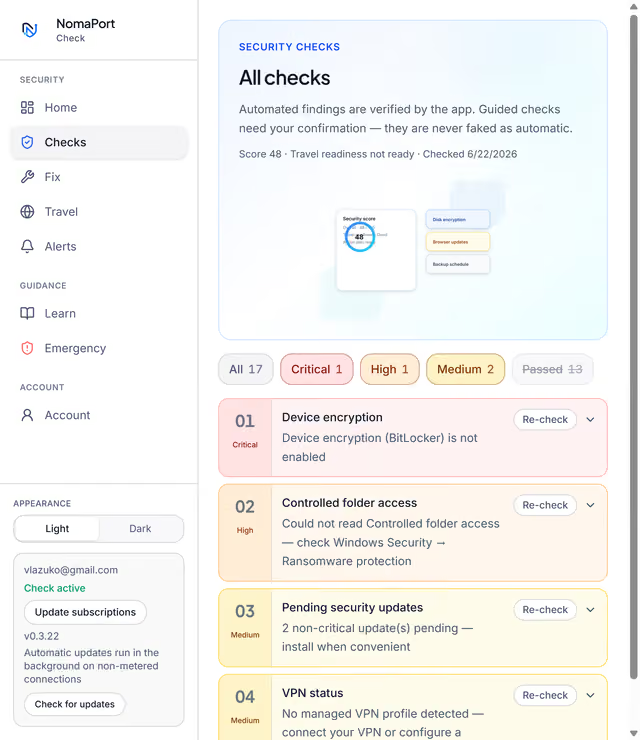
NomaPort Check list of device security checks with severity filters

17 automated security checks

Device encryption, VPN, updates, firewall, and more — filtered by severity with one-click re-check.
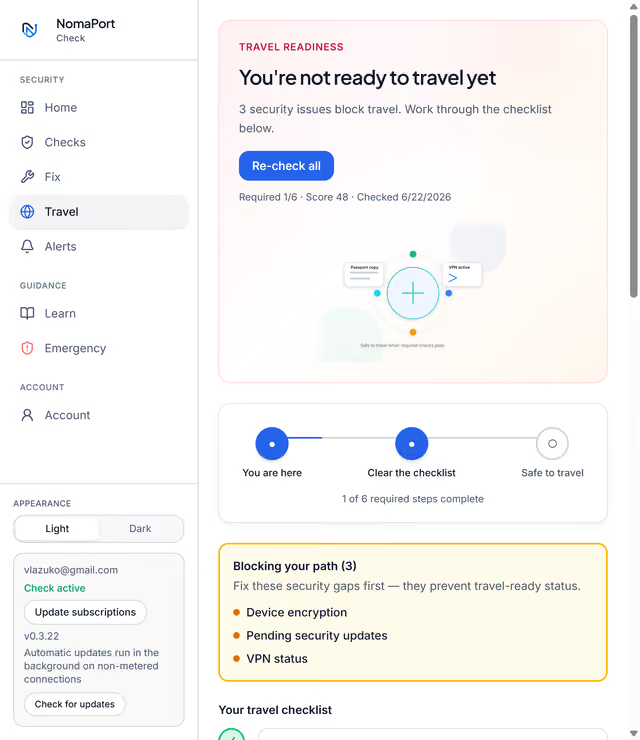
NomaPort Check travel readiness checklist with blocking issues

Travel readiness checklist

Required steps before a trip, blocking issues highlighted, and progress tracked step by step.

Start here

Three ways to get started

Not sure where to begin? Pick the path that matches how you work today.

Start with a bundle

The fastest route for most people. One purchase unlocks Roam hardware plus Check, Learn and guided setup.

  • Check + Learn Kit for device checks and training
  • Secure Go Kit for solo travellers with Roam
  • Secure Team Kit for small teams
  • Field Kit for demanding field work
Compare bundles

Pick individual products

Already have some tools covered? Subscribe to Roam, Check, Learn or add-ons one at a time.

  • Mix and match what you need
  • Upgrade to a bundle later
  • See clear pricing per product
View pricing

Digital tools only

No hardware needed. Check, Learn, AI, Vault and Comms run from your dashboard and NomaApp.

  • Subscribe online in minutes
  • Access from browser or app
  • Team dashboards where included
Explore products

Hardware kits

From order to secure connection

These steps apply to bundles and products that include a Roam hotspot. Digital-only plans skip hardware — subscribe and start in minutes.

Step 1

Choose your package

Select Roam standalone or a bundle that includes Check and Learn. Pick eSIM, SIM or data for your regions.

Step 2

Device ships ready

Your hotspot arrives preconfigured with unique Wi-Fi credentials on the onboarding card or sticker.

Step 3

Turn on and connect

Power on, join the Wi-Fi network and start working. Every connected device routes through your VPN.

NomaPort does not operate a VPN network. We configure and enforce your chosen VPN at the hotspot level so all connected devices benefit.

Learn about VPN options
NomaPort RoamVPN · ConnectedKill switch · EnabledDNS · SecureConnected devicesLaptop · Phone · Tablet
Security scoreOverall · 78 / 100Travel readiness · Good2 urgent actionsEnable disk encryptionUpdate browserReview backup schedule78

Digital products

Subscribe and start in minutes

Check, Learn, AI, Vault and Comms do not require hardware. After checkout you get immediate access to your dashboard.

1

Subscribe online

Pick a plan on the pricing page or inside your account. Bundles unlock multiple products at once.

2

Open your dashboard

Sign in at nomaport.com or connect NomaApp on your phone. Your products appear based on your plan.

3

Use it daily

Run device checks, complete training, review alerts and follow guided setup — all from one place.

After setup

Security that keeps working

Ongoing checks, not a one-time audit

NomaPort Check updates your device posture as software, travel plans and risks change.

  • Monthly reminders and practical alerts
  • Updated checklists as threats evolve
  • PDF reports for your records

Team support when you need it

Team customers get structured onboarding, shared dashboards and regular readiness reports.

  • Admin dashboard with member status
  • Training completion tracking
  • Support workflows for rollout

Ready to get started?

Choose a bundle for the best value, or pick individual products that match your needs today.

See pricing